Inventory & Shipping Operations Training
Overview
Essential training for CSRs on inventory management and shipping coordination at Scott Recycling.
Lesson 1: Understanding Our Inventory System
What is Inventory in E-Waste Recycling?
When our trucks pick up electronics from customers, those items enter our inventory system. As a CSR, you won't be doing the hands-on processing, but customers WILL call you with questions about their material. You need to know how to look it up and explain what's happening.
Inventory includes:
- Devices received from customer pickups (laptops, desktops, servers, phones, tablets, monitors, networking equipment)
- Processing status — where each item is in our workflow
- Testing and grading results — what condition it's in
- Sales channel assignments — where resellable items get listed (eBay, direct sales, wholesale)
- Data destruction status — critical for customers who need Certificates of Destruction
- Shipping and delivery tracking — for items sold to buyers
Inventory States
- Received: Arrived at our facility from a pickup, not yet processed
- Processing: Being tested, graded, and sorted by the warehouse team
- Ready for Sale: Tested, graded, data wiped, and listed on sales channels
- Sold: A buyer has purchased the item, awaiting shipment
- Shipped: On the way to the buyer
- Recycled: Not resellable — dismantled and materials sent for responsible processing (metals smelted, plastics ground, hazardous materials handled by certified processors)
Your Role as CSR
You're the customer's point of contact. When they call with questions, you need to find answers:
- "What happened to the laptops we sent you last month?" — Look up their items in inventory
- "Can I get a certificate of destruction?" — Check if data destruction is complete, generate the cert
- "Have any of our items been sold? What did they go for?" — Check sales/shipping status
- "When is our next scheduled pickup?" — Check their customer record
- "I shipped a pallet to you — did it arrive?" — Check receiving records
Lesson 2: Processing & Grading
Device Processing Workflow
Step 1: Intake - Device received from customer - Serial number recorded - Initial condition assessment - Assigned to processing queue
Step 2: Testing - Power on test - Functionality check - Cosmetic inspection - Data wiping verification
Step 3: Grading - Grade A: Like new, fully functional - Grade B: Good condition, minor wear - Grade C: Fair, visible wear but functional - Grade D: Parts/repair only
Step 4: Listing - Photographed - Listed on appropriate channels (eBay, website, etc.) - Pricing determined by grade & demand
Customer Questions to Expect
"When will my devices be processed?"
- Standard turnaround: 5-7 business days from receipt
- Large volumes (10+ pallets) may take longer — check with the warehouse
- Look up their batch in the inventory system for real-time status
- Don't promise a specific date you can't guarantee — say "typically within a week, but let me check your specific batch"
"How much will I get for my items?"
- Most customers don't receive payment — our free pickup service IS the value exchange
- For asset management customers with high-value equipment (recent servers, laptops), payment depends on grade and current market value
- We cannot quote a value until items are tested and graded
- If a customer asks about this, check if they're set up as an asset management client or standard recycling
"Can I get a certificate of destruction?"
- Yes — this is one of our most important services, especially for hospitals, banks, and government
- Certificates are issued after data wiping/destruction is complete
- Check the inventory system to see if their drives have been processed
- If they need one urgently, flag it in the system and notify the warehouse team
"What happens to items that can't be resold?"
- Devices that are too old or damaged for resale are dismantled at our facilities
- Components are sorted: metals go to smelting, plastics go to our grinding operation, glass is processed, and circuit boards are sent to certified precious metals recovery
- Hazardous materials (lead from CRTs, mercury from old displays) are handled by certified processors — never landfilled
- This is a great talking point for environmentally conscious customers
Lesson 3: Shipping Coordination
Outbound Shipping (To Buyers)
Process: 1. Sale confirmed 2. Device pulled from inventory 3. Packaged securely 4. Shipping label generated 5. Tracking number sent to buyer 6. Scanned as shipped
Shipping Methods: - USPS (standard, cost-effective) - UPS (faster, tracking) - FedEx (priority, large items) - Local pickup (pre-arranged)
Inbound Pickups (From Customers)
This is the bread and butter of your job as a CSR. When you schedule a pickup, here's what happens behind the scenes:
The Pickup Process:
- Customer requests a pickup (inbound call, Queue D response, or your outbound call)
- You log the request in the system: location, estimated volume, preferred date, special instructions
- The logistics team optimizes the route based on geography and truck capacity
- Date is confirmed — either the one the customer requested or the nearest available slot on that route
- The customer gets a confirmation
- Our driver arrives, loads the material, and marks the pickup complete in the system
What to Tell Customers When Scheduling:
- "Please have all items consolidated and accessible — ideally near a loading dock or ground-level entrance."
- "Our driver will handle all the loading, but the material needs to be reachable."
- "If you have data security concerns, our team will handle complete data destruction at our facility. You don't need to wipe anything yourself, but you're welcome to."
- "Pickups are during business hours, typically 8 AM to 5 PM."
- "Please make sure someone is available to meet the driver and direct them."
- "Remove loose batteries if possible — we don't transport loose batteries. The batteries inside laptops and phones are fine."
Volume Estimates — Help Customers Think in Terms We Use:
| Customer Says | Roughly Means |
|---|---|
| "A few items" | Less than a box — maybe combine with a nearby stop |
| "A couple boxes" | Small pickup — fits in a van |
| "Several pallets" | Standard pickup — box truck |
| "A whole server room" / "office cleanout" | Large pickup — may need a full truck or multiple trips |
Getting a decent volume estimate helps logistics plan the right vehicle.
Lesson 4: Shipping Issues & Resolution
Common Shipping Problems
Lost Package: 1. Verify tracking status 2. File carrier claim 3. Refund or reship decision 4. Update customer immediately 5. Document for records
Damaged in Transit: 1. Get photo evidence 2. Check packaging standards 3. File insurance claim 4. Issue refund/replacement 5. Review packaging procedures
Delayed Delivery: 1. Check carrier updates 2. Provide customer with tracking 3. Escalate if beyond expected time 4. Offer compensation if appropriate 5. Follow up when delivered
When to Escalate
- Value >$500
- International shipping
- Customer threatening negative review
- Repeat issues with same carrier
- Insurance claim needed
Lesson 5: Inventory Reporting & Customer Updates
Status Updates for Customers
Proactive Communication: - Pickup confirmation (within 24 hours) - Processing started (when queue begins) - Items graded (with results) - Items listed (with links) - Items sold (with payment timeline) - Shipping confirmation (with tracking)
Using the Inventory System
Key Functions: - Search by customer name - Filter by status - View processing timeline - Generate reports - Export data
Customer Self-Service: - Portal access (if enabled) - Real-time status - Payment history - Certificate downloads - Pickup scheduling
Reporting
Standard Reports: - Weekly processing summary - Monthly sales by category - Shipping performance - Customer pickup schedule - Payment reconciliation
Custom Requests: - Quarterly tonnage reports - Environmental impact certificates - Compliance documentation - Audit trails
Quick Reference
Processing Timeline
- Pickup to Intake: Same/next day
- Intake to Testing: 2-3 days
- Testing to Grading: 1 day
- Grading to Listing: 1-2 days
- Listing to Sale: Variable (hours to months)
- Sale to Shipment: 1-2 days
Common Customer Questions — Quick Answers
| Question | Your Answer |
|---|---|
| "Where's my pickup?" | Check the customer record for the scheduled date. If it's past due, contact dispatch and call the customer back. |
| "Do you wipe data?" | "Yes — we guarantee secure data destruction on all hard drives and storage devices." |
| "Can I get a certificate?" | "Absolutely. Once your data-bearing devices are processed, we issue a Certificate of Destruction. I'll make sure that's noted on your account." |
| "What do you do with the stuff?" | "Resellable items are tested, graded, and sold. Everything else is dismantled — metals are smelted, plastics are ground for reuse, and hazardous materials go to certified processors. Nothing goes to a landfill." |
| "Can I drop off instead?" | "Yes! You can drop off electronics at any of our six facilities during business hours." |
| "Is there a cost?" | "Free for most electronics. CRT monitors and TVs carry a small fee because of the lead in the glass. Everything else is no charge." |
| "Can you come to [state]?" | Check if it's in our service area: GA, TN, KY, VA, NC, SC, AR, MS, AL. If not, politely let them know and offer to check if we can accommodate. |
| "Do you buy equipment?" | "For newer, high-value items, our asset management team may be able to offer payment. Let me connect you with them." |
Doing This in Odoo
The inventory and shipping concepts from this training are managed through two apps:
Checking Inventory Status
When a customer asks about their items, open Inventory Processing from the app menu:
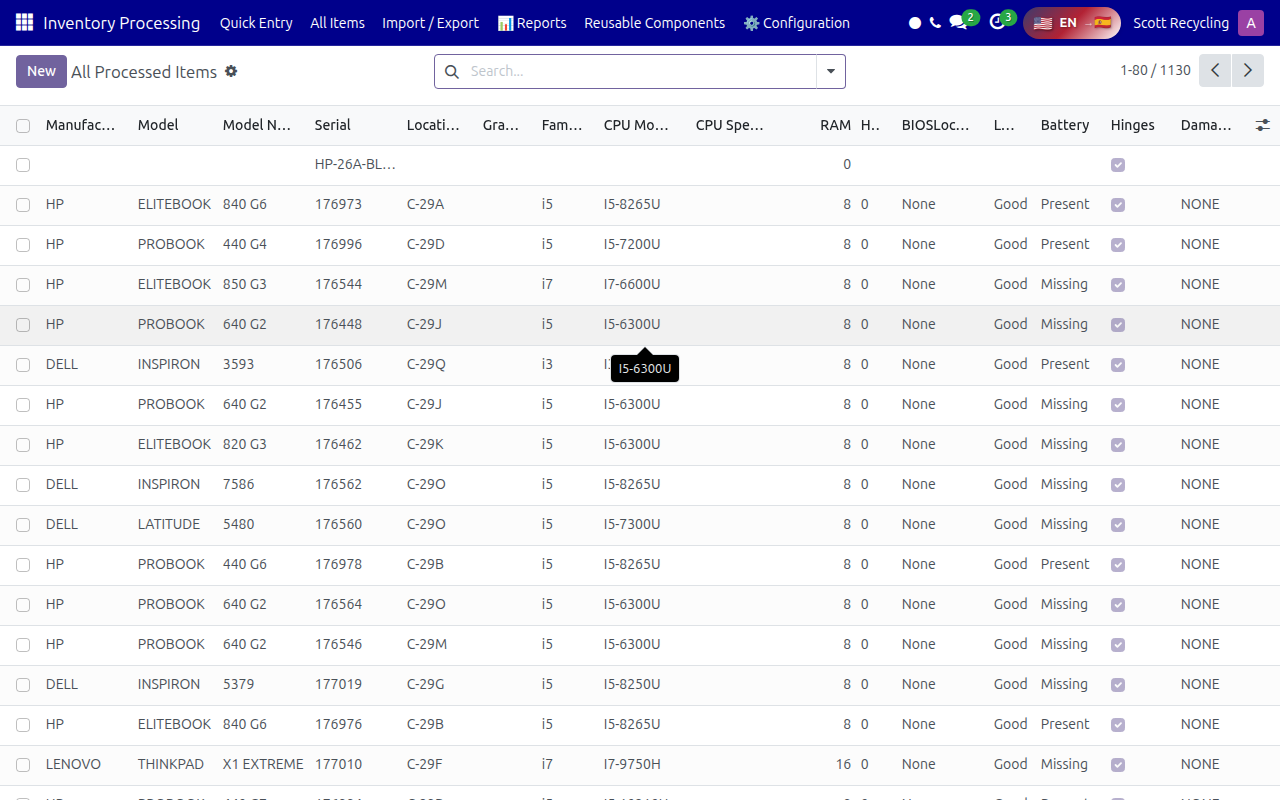
- Search by serial number to find a specific device
- Check the Grade, Location, and processing status
- View all specs (CPU, RAM, battery, screen condition) to answer customer questions
For the full guide, see Inventory Processing.
Checking Shipping Status
For shipping questions, open the Shipping app:
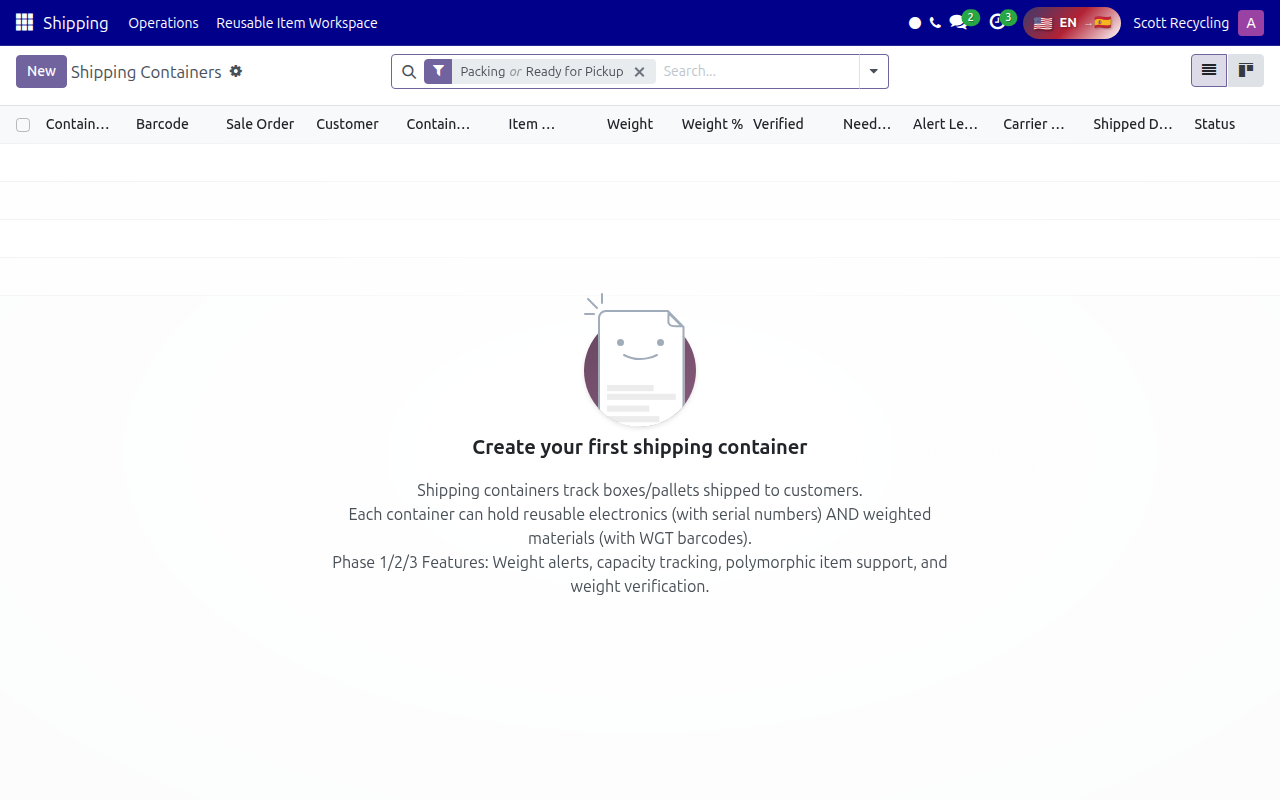
- Search by customer name or sale order to find a shipment
- Check the Status column (Packing, Ready for Pickup, Shipped)
- View the Shipped Date and Carrier for tracking info
For the full guide, see Shipping.
Remember: Clear communication about processing and shipping builds customer trust!