Fleet Management
Last Updated: February 2026
The Fleet app manages Scott Recycling's vehicles, driver assignments, service tracking, and GPS integration. It's used by dispatchers (truck availability), mechanics (vehicle status), and managers (fleet oversight).
What the Fleet App Does
The Fleet app is the central record for every vehicle in the fleet. It tracks:
- Vehicle identity — make, model, license plate, fleet number, dispatch name
- Driver assignments — who drives which truck, with full history
- Capacity and type — box limits, tractor trailer vs. box truck
- Vehicle status — in service, in shop, downgraded, or pending
- GPS integration — Samsara vehicle and driver codes for real-time tracking
- Service history — linked to maintenance requests in the Maintenance app
Open the Fleet app from the main Odoo dashboard.
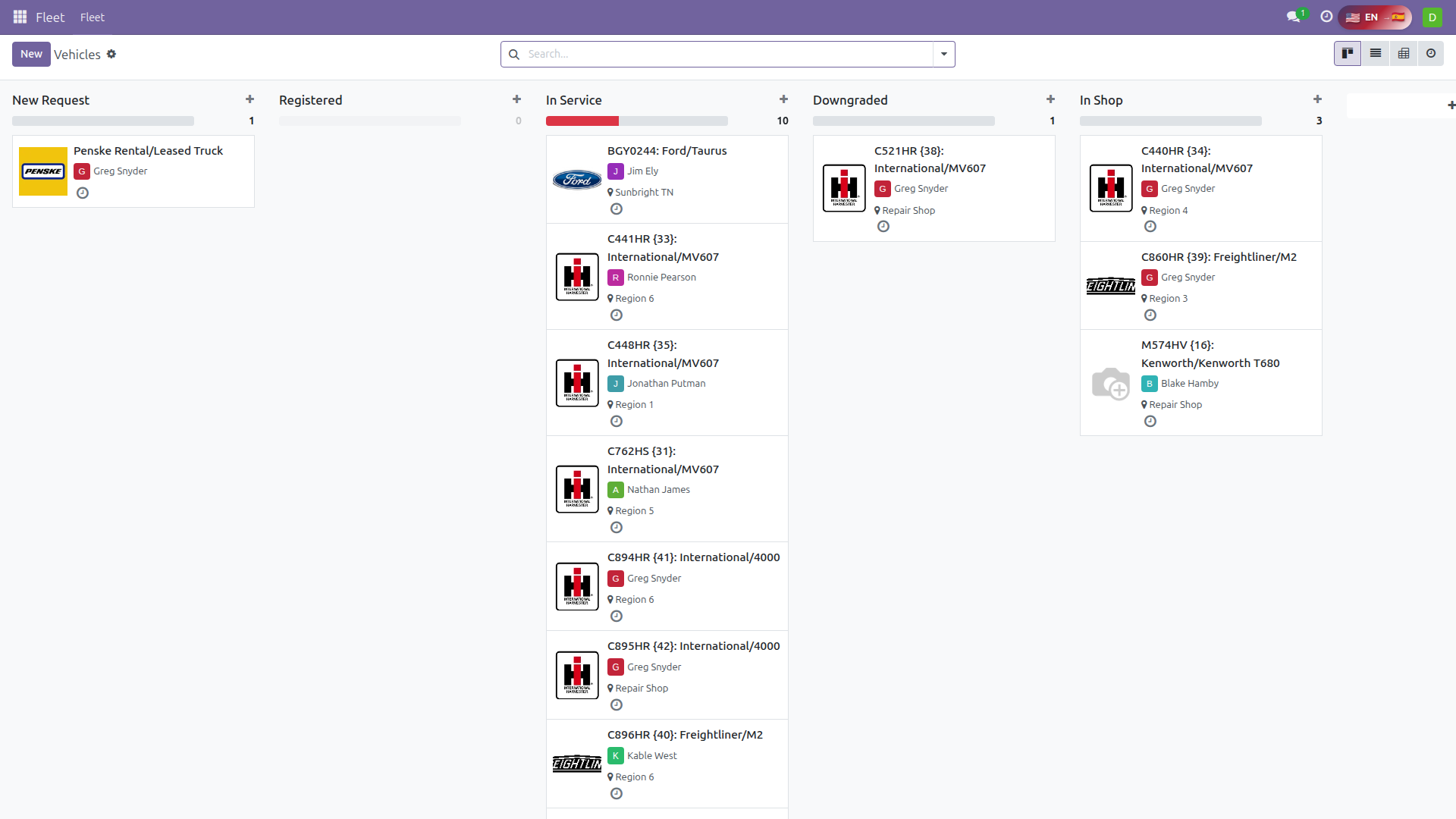 Fleet Management — vehicles organized by status (New Request, In Service, Downgraded, In Shop) with driver and region assignments
Vehicle Record — Field by Field
Open any vehicle in the Fleet app and you'll see these fields:
Identity Fields
| Field | What It Means | Example |
|---|---|---|
| Name | Make/model and fleet identification. Auto-generated. | "Freightliner/M2/C896HR {40}" |
| License Plate | Used for identification on routes, in Samsara, and with DOT. | "C896HR" |
| Truck Number | Internal fleet number (the number in curly braces). | "{40}" |
| Dispatch Name | Short name used in route names and dispatch communication. | "SBT-1" |
| Vehicle Category | Classification of the vehicle type. | "Box Truck", "Tractor Trailer", "Small Truck" |
| Truck Color | Vehicle color for visual identification. | "White" |
Assignment Fields
| Field | What It Means | Example |
|---|---|---|
| Driver | The employee normally assigned to drive this vehicle. Stored as driver_employee_id. |
"Kable West" |
| Region | Default geographic region this truck serves. Determines which routes it can be scheduled on. | "Sunbright TN" |
| Allowed Regions | All regions this truck can serve (may include multiple beyond the default). | "Sunbright TN, Morristown TN" |
| Dispatch Location | The warehouse this truck departs from and returns to. | "Sunbright Warehouse" |
Capacity Fields
| Field | What It Means | Example |
|---|---|---|
| Total Limit | Maximum number of boxes the truck can hold. The scheduling system enforces this limit. | 12 (box truck) or 48 (tractor trailer) |
| Is Tractor Trailer | True for OTR/long-haul trucks. False for local box trucks. Determines which calendar the truck appears on. | True / False |
| Fuel Capacity | Fuel tank capacity for trip planning. | Varies by vehicle |
| Fuel Card | Fuel card number assigned to this vehicle. | "FC-12345" |
GPS Integration Fields
| Field | What It Means | Example |
|---|---|---|
| Samsara Vehicle Code | Samsara's identifier for this vehicle. Required for GPS tracking and route pushing. | "281474976710657" |
| Samsara Driver Code | Samsara's identifier for the assigned driver. Validated when pushing routes. | "281474976710658" |
Vehicle States
Every vehicle has a state that determines its availability for dispatch:
| State | Meaning | Available for Routes? |
|---|---|---|
| In Service | Operational and ready for routes | Yes |
| In Shop | In the garage for maintenance or repair | No |
| Downgraded | Can still run but has limitations (e.g., minor issue, reduced capacity) | Yes, with caution |
| New Request | Newly added vehicle, not yet cleared for routes | No |
Vehicle State and Dispatch
Dispatchers should check vehicle state before assigning routes. A truck marked "In Shop" should not be scheduled. A truck marked "Downgraded" can be used but the dispatcher should be aware of any limitations noted in the vehicle record.
Vehicle Usage Tracking
The Fleet app tracks the full lifecycle of vehicle usage through a checkout/check-in system:
| Status | What's Happening |
|---|---|
| Draft | Vehicle use has been requested but not confirmed |
| Reserved | Vehicle is reserved for a specific date/driver |
| In Use | Vehicle is currently out on a route |
| Returned | Vehicle has been returned to the warehouse |
This lifecycle connects to the truck schedule system — when a route goes to "In-Progress," the vehicle moves to "In Use."
Driver Assignment History
The Fleet app maintains a history of driver assignments for each vehicle. When the driver field changes:
- The previous assignment is ended with a date
- The new assignment is started
- The full history is viewable on the vehicle record
This is important for:
- Accountability — knowing who drove a truck on a specific date
- Maintenance — correlating driver behavior with vehicle wear
- Scheduling — understanding driver-truck familiarity
Service History
Each vehicle's maintenance history is tracked through the Maintenance app and linked to the Fleet record. From a vehicle record, you can see:
- All past maintenance requests (corrective and preventive)
- Current open requests
- Next scheduled preventive maintenance
For details on managing maintenance requests, see the Maintenance Guide.
Samsara Integration
Scott Recycling uses Samsara for GPS tracking and route management. The Fleet app stores the connection between Odoo vehicles and Samsara:
Setting Up a Vehicle in Samsara
- The Samsara Vehicle Code must match the vehicle's ID in Samsara's system
- The Samsara Driver Code must match the driver's ID in Samsara
- Both codes are validated when routes are pushed to Samsara
What Samsara Provides
- Real-time GPS tracking — vehicle location updated continuously
- Route optimization — AI-powered stop sequencing based on road networks
- Driver ETA updates — automatic arrival time predictions
- Geofence alerts — notifications when vehicles enter/leave defined areas
- Driver behavior monitoring — speed, braking, idle time
Samsara in the Sandbox
In the training sandbox, Samsara integration is disabled. The Push to Samsara button exists but won't send data. All other fields work normally.
Key Vehicles at Scott Recycling
| Truck | Dispatch Name | Type | Usual Driver | Capacity | Notes |
|---|---|---|---|---|---|
| C896HR | SBT-1 | Box Truck | Kable West | 12 boxes | Freightliner M2 |
| C441HR | SBT-2 | Box Truck | Ronnie Pearson | 12 boxes | International MV607 |
| C448HR | MOR-1 | Box Truck | Jonathan Putman | 12 boxes | International MV607 |
| Ryder Rental | PUL-1 | Box Truck (rental) | Devin Sutphin | 12 boxes | Ryder rental truck — Pulaski region |
| M574HV | — | Tractor Trailer | Blake Hamby | 48 boxes | Kenworth T680 — OTR |
| M5857HY | — | Tractor Trailer | Blake Hamby | 48 boxes | Freightliner Cascadia |
Key Drivers
| Driver | Title | Truck Type |
|---|---|---|
| Kable West | Box Truck Driver | Box truck (SBT-1) |
| Jonathan Putman | Box Truck Driver | Box truck (MOR-1) |
| Ronnie Pearson | Driver Trainer | Box truck (SBT-2) |
| Brandon Collins | Box Truck Driver | Box truck |
| Blake Hamby | OTR Driver | Tractor trailer |
| Devin Sutphin | Box Truck Driver | Box truck (rental) |
| Summer Benedict | Dispatcher | (coordinates, doesn't drive) |
Box Truck vs. Tractor Trailer
Box trucks hold up to 12 boxes and handle local routes (3-5 stops per day). Tractor trailers hold up to 48 boxes and run long-haul OTR routes. The system enforces these limits when scheduling — you'll see a Capacity Warning if a route exceeds 80% of the truck's limit.