Position Profiles (Job Architecture)
Overview
The SR Job Architecture module extends Odoo's job positions into full position profiles -- the single source of truth for what each role at Scott Recycling requires. Each profile links a training path, KPI template, and evaluation criteria together in one place, and provides smart buttons for quick access to employees, performance data, and pending evaluations.
Last Updated: February 2026 Target Audience: HR, Managers
Navigation
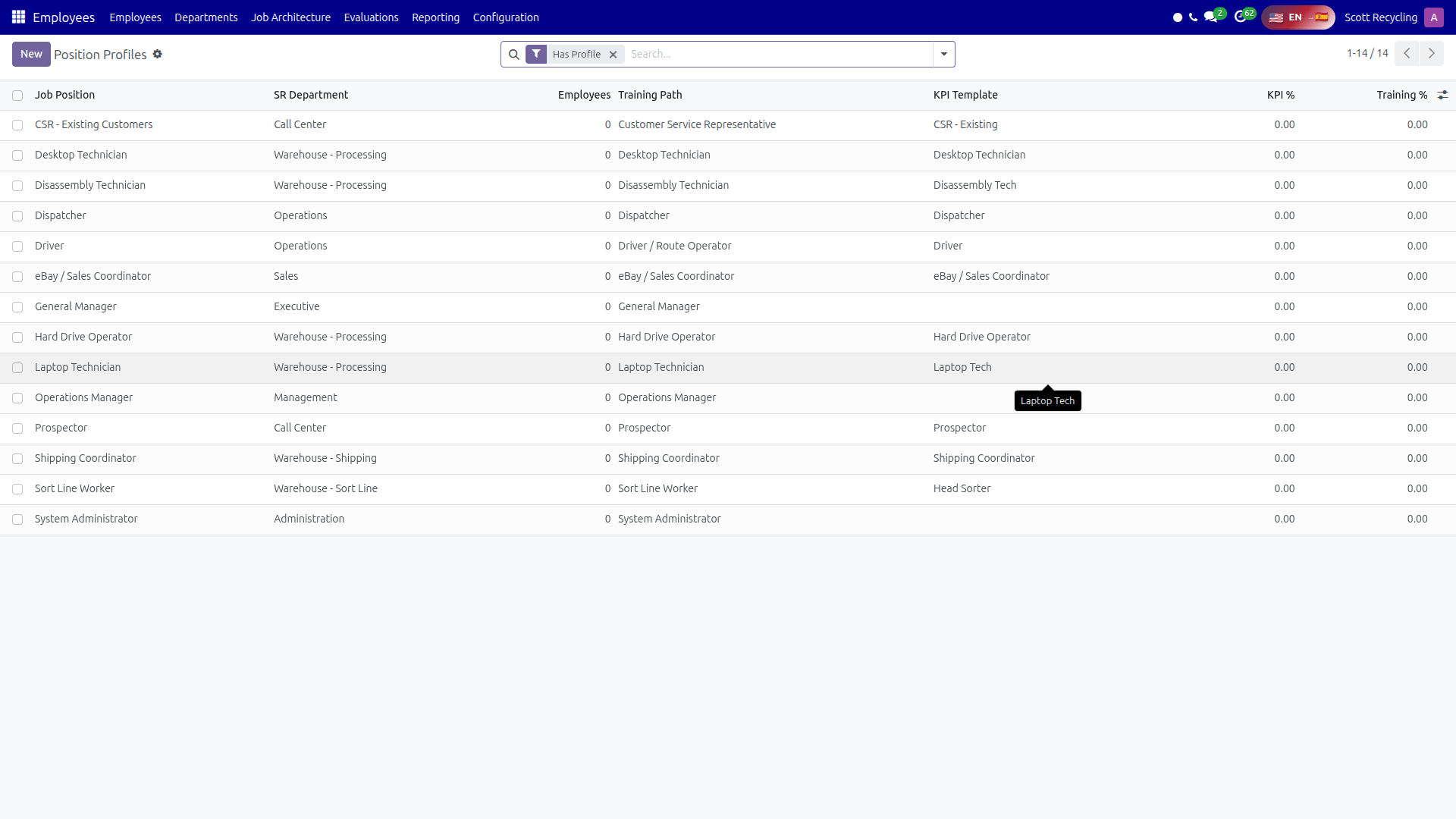 Position Profiles — the central hub linking training, KPIs, and evaluations for each role
Position Profile Form
Each position profile extends the standard Odoo hr.job record with Scott Recycling-specific fields.
Core Fields
| Field | Description |
|---|---|
| Job Title | Name of the position |
| SR Department | Scott Recycling department classification |
SR Department Values
| Value | Label |
|---|---|
call_center |
Call Center |
warehouse_sort |
Warehouse - Sort Line |
warehouse_process |
Warehouse - Processing |
warehouse_shipping |
Warehouse - Shipping |
operations |
Operations |
sales |
Sales |
management |
Management |
executive |
Executive |
admin |
Administration |
Smart Buttons
The top of each position profile shows smart buttons with live metrics:
| Button | What It Shows |
|---|---|
| Employees | Number of active employees in this role. Click to view the list. |
| KPI % | Average KPI performance today for employees in this role. Click to view daily KPI records. |
| Training % | Average onboarding progress for employees still in training. Click to view progress records. |
| Pending Evaluations | Number of in-progress evaluations for employees in this role. Click to view them. |
| Directives | Directive assignments for employees in this role. Click to view them. |
Linked Systems
The Linked Systems section connects the position profile to other HR modules:
| Field | Description |
|---|---|
| Training Path | Link to an onboarding role (sr.onboarding.role). Defines which playbooks new hires in this role must complete. |
| KPI Template | Link to a KPI template (sr.kpi.template). Defines the performance metrics tracked for this role. |
| Evaluation Templates | Links to evaluation templates (sr.evaluation.template). Defines the criteria used when evaluating employees in this role. |
Keep linked systems up to date
When you create a new training path, KPI template, or evaluation template, link it to the appropriate position profile. This ensures new employees are automatically set up with the right tools when they are assigned to a job.
Detail Tabs
Each position profile has tabs with rich text (HTML) fields for detailed job descriptions:
| Tab | Description |
|---|---|
| Overview | General description of the role (standard Odoo job description field) |
| Responsibilities | Key duties and expectations |
| Qualifications | Required skills, education, and experience |
| Physical Requirements | Physical demands of the role |
| Reporting Structure | Who this role reports to and who reports to it |
| Career Path | Advancement opportunities from this role |
| Tools & Software | Systems and equipment used in this role |
Auto-Linking
When an employee is assigned to a job position (by setting the Job Position field on their employee record), the system automatically populates:
- Onboarding Role -- from the position profile's Training Path (only if the employee does not already have one)
- KPI Template -- from the position profile's KPI Template (only if the employee does not already have one)
This means you configure the position profile once, and every new employee assigned to that job gets the right training path and KPI template without manual setup.
Position Profiles List View
The list view shows key data at a glance:
| Column | Description |
|---|---|
| Name | Job title |
| SR Department | Department classification |
| Employees | Number of active employees |
| Training Path | Linked onboarding role name |
| KPI Template | Linked KPI template name |
| KPI % | Average KPI performance for today |
| Training % | Average onboarding progress for employees in training |
Search and Filters
| Filter/Group | Description |
|---|---|
| Has Profile | Profiles with an SR Department set |
| By Department | Filter by SR Department value |
| Has KPI Template | Profiles with a KPI template linked |
| No KPI Template | Profiles missing a KPI template |
Common Tasks
Viewing a Position Profile
- Navigate to Job Architecture > Position Profiles
- Click on a job title to open the full profile
- Use the smart buttons at the top to drill into employees, KPIs, training, or evaluations
Linking Training to a Role
- Open the position profile
- In the Linked Systems section, set the Training Path to the appropriate onboarding role
- Save -- all future employees assigned to this job will inherit this training path
Checking Role Performance Metrics
- Open the position profile
- The smart buttons show today's KPI % and Training %
- Click KPI % to see individual daily KPI records
- Click Training % to see individual onboarding progress records
Security
| Group | Access |
|---|---|
| Viewer | View position profiles and linked data. |
| Editor | Edit position profiles and link training, KPI, and evaluation systems. |
| Administrator | Full access including creating and deleting profiles. |
Questions? Contact your supervisor or HR administrator.