Attendance Dashboard
Last Updated: February 2026 Target Audience: HR Managers, Operations Managers
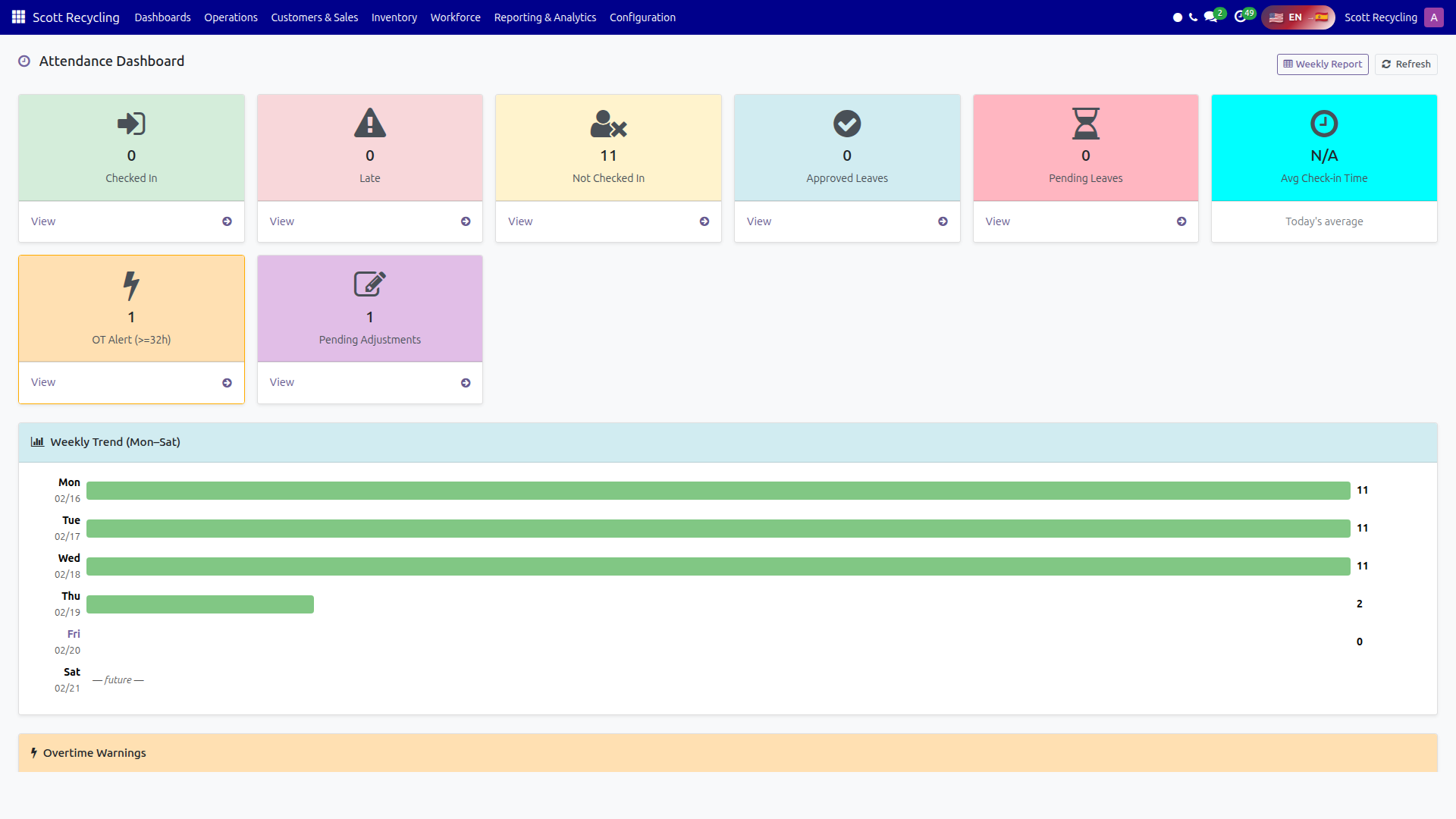
The Attendance Dashboard provides a real-time overview of employee attendance — who's checked in, who's late, overtime alerts, and weekly trends.
Navigation: Scott Recycling > Dashboards > Attendance Dashboard
Header Actions
| Button | Action |
|---|---|
| Weekly Report | Opens the payroll report in a new tab (/workforce/payroll-report) |
| Refresh | Reloads all dashboard data |
Metric Cards
Eight cards are displayed across the top row. Click any card (except Avg Check-in Time) to open the related list view.
| Card | Color | Metric | What It Shows | Click Action |
|---|---|---|---|---|
| Checked In | Green | Count | Employees currently checked in today | Opens attendance records list |
| Late | Red | Count | Employees who checked in after their scheduled start | Opens late attendance records |
| Not Checked In | Yellow | Count | Employees who have not checked in today | Opens employee list (excludes salaried employees) |
| Approved Leaves | Blue | Count | Approved leave requests this month | Opens approved leave requests |
| Pending Leaves | Pink | Count | Leave requests awaiting approval this month | Opens pending leave requests |
| Avg Check-in Time | Cyan | HH:MM | Average check-in time for today | Display only — not clickable |
| OT Alert (>=32h) | Orange | Count | Employees with 32+ hours this week | Opens employee list filtered to OT warnings |
| Pending Adjustments | Purple | Count | Attendance adjustment requests pending review | Opens adjustment request list |
Note
The Not Checked In card excludes salaried employees since they may not use the time clock.
Weekly Trend
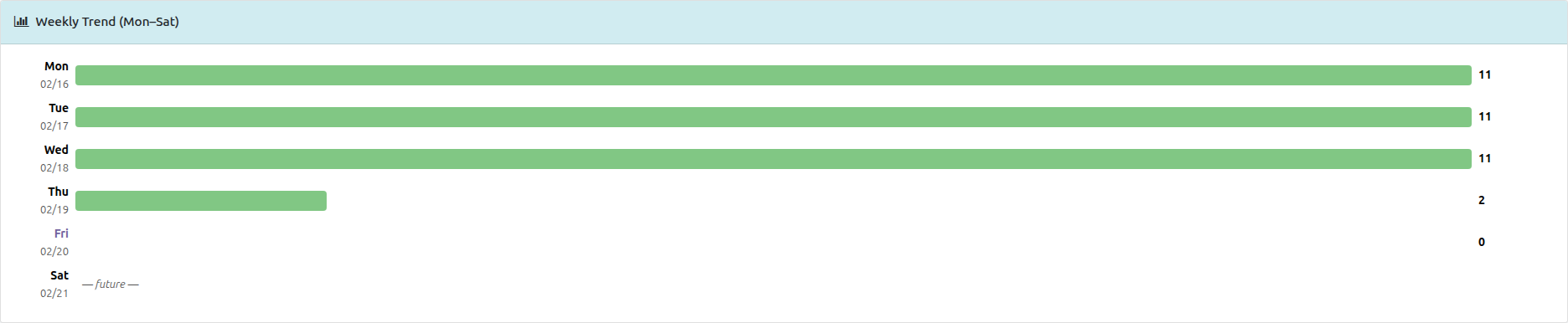
Below the cards is a horizontal bar chart showing attendance for Monday through Saturday of the current week.
| Element | Meaning |
|---|---|
| Green bar | Total headcount (employees checked in) |
| Orange overlay | Late arrivals count |
| Blue label (today) | Today's row is highlighted with bold blue text |
| "— future —" | Days that haven't occurred yet show an italic placeholder |
Each row displays the day label, date, a proportional bar, and a count like 24 (3 late).
Overtime Warnings

This section appears when employees have 32 or more hours logged this week. It shows the top 10 employees sorted by hours worked.
| Column | Description |
|---|---|
| # | Row number |
| Employee | Employee name |
| Hours This Week | Total hours worked so far this week |
| Status | Badge: Over 40h (red) or Approaching (orange) |
Warning
Employees showing Over 40h are in overtime. Review immediately to manage labor costs.
Top 5 Late Arrivals
A table listing the five latest check-ins for today:
| Column | Description |
|---|---|
| # | Rank (1 = latest arrival) |
| Employee | Employee name |
| Check-in Time | Time they checked in (formatted for US/Eastern timezone) |
If no employees are late, the section shows "No late arrivals today."
Common Tasks
Morning attendance check
- Open the Attendance Dashboard shortly after shift start time.
- Check the Checked In count against expected headcount.
- Review Not Checked In to see who hasn't arrived.
- Click Late to see who came in after their scheduled time.
Weekly overtime review
- Check the OT Alert card for the count of employees approaching overtime.
- Scroll to the Overtime Warnings table for details.
- Employees with Over 40h badges need immediate schedule adjustments.
- Click the OT Alert card to open the full employee list for further action.
Process adjustment requests
- Check the Pending Adjustments card.
- Click it to open the list of adjustment requests.
- Review each request and approve or deny as appropriate.
Troubleshooting
| Issue | Solution |
|---|---|
| Checked In count seems low | Employees may not have clocked in yet. Check the Not Checked In list. |
| Avg Check-in Time shows "--:--" | No employees have checked in yet today. |
| OT Warnings not showing | The section only appears when at least one employee has 32+ hours. |
| Employee shows as "Not Checked In" but is present | They may need to use the attendance kiosk to clock in. |