Advanced Call Techniques for CSRs
Overview
Master professional phone communication skills for handling customer inquiries, sales calls, and service issues at Scott Recycling.
Lesson 1: Professional Phone Etiquette
The Perfect Greeting
Script: "Thank you for calling Scott Recycling, this is [Your Name]. How may I help you today?"
Key Elements: - Company name (they know who they called) - Your name (personal connection) - Offer to help (welcoming) - Warm, friendly tone
Active Listening
Techniques: - Don't interrupt - Take notes while they speak - Use verbal acknowledgments ("I understand", "I see") - Paraphrase to confirm understanding - Ask clarifying questions
Call Control
Staying on Track: - Politely redirect tangents - Set expectations for call length - Use transition phrases ("Let me help you with that...") - Summarize agreed actions - Confirm next steps before ending
Lesson 2: Handling Difficult Calls
De-escalation Techniques
The LEAP Method: - Listen: Let them vent without interruption - Empathize: "I understand your frustration" - Apologize: "I'm sorry this happened" - Problem-solve: Offer solution
Managing Angry Customers
DO: - Stay calm and professional - Lower your voice tone - Acknowledge their feelings - Take responsibility (for company) - Focus on solutions - Follow up to ensure resolution
DON'T: - Get defensive - Argue or blame - Make excuses - Rush them off phone - Take it personally - Promise what you can't deliver
Transferring Calls Properly
Never blind transfer!
Proper Transfer Process: 1. Explain why transfer is needed 2. Get customer permission 3. Call recipient first (warm transfer) 4. Brief recipient on situation 5. Introduce customer to recipient 6. Stay on line until connected
Lesson 3: Sales Call Techniques
Qualifying Questions for E-Waste Prospects
SPIN Selling Framework — Applied to Scott Recycling:
- Situation: "Tell me about your current process for retiring old electronics. What do you do with them when they reach end of life?"
- Problem: "Are you running into any challenges with that? Storage space filling up? Compliance concerns? IT staff spending time on disposal?"
- Implication: "If those old hard drives are just sitting in a closet, that's actually a data security risk — and some regulations require documented destruction. How would that affect you?"
- Need-payoff: "What if we could pick everything up for free, handle the data destruction with documentation, and you never had to think about it again?"
Building Rapport
Techniques:
- Use their name naturally (once or twice per call — not every sentence)
- Mirror their pace and style — if they're all-business, be concise; if they're chatty, engage
- Reference their industry: "We work with a lot of [hospitals/schools/offices] in the area, so we understand your needs"
- Remember previous conversations — the chatter on their record is your cheat sheet
- Be genuine — people can tell when you're reading a script vs. actually caring
Handling Objections
"We already have a recycling provider"
- "That's great that you're already recycling responsibly! How long have you been working with them?"
- "What do you like most about their service?"
- "Just so you know, most of our services are free — we pick up at no charge. If you ever want to compare, I'd be happy to set up a trial pickup."
- Don't push hard — plant the seed and schedule a follow-up
"We just throw old electronics away"
- "You're not alone — a lot of companies start that way. The challenge is that electronics in landfills can leach lead, mercury, and other toxics into groundwater."
- "In some states, it's actually illegal to landfill certain electronics. We make it easy — free pickup, and you get documentation for your records."
- This is a strong conversion opportunity — they need education, not a hard sell
"We need to think about it"
- "Absolutely, take your time. Can I ask — is there a specific concern I can address?"
- "What information would help you make a decision? I can send over our data destruction documentation if that would help."
- "When would be a good time to follow up? I'll make sure to call you then."
- Always get a specific follow-up date — don't leave it open-ended
"Your competitor quoted a lower price" / "I found someone cheaper"
- "Thanks for letting me know. May I ask what they're charging for and what's included?"
- "Our standard electronics pickup is free — we don't charge per pound or per pallet for most items. Are they offering the same?"
- "Do they provide Certificates of Destruction for hard drives? That's included in our service at no extra cost."
- Focus on the total value, not a line-item price war
"We don't have enough material to justify a pickup"
- "Even a few boxes is worth a pickup for us — there's no minimum. We route our trucks to cover the whole area, so we can usually fit you in."
- "If you'd prefer, you can also drop off material at any of our six locations."
- "Some customers like to accumulate for a few months and then schedule. Would that work better for you?"
"I'm worried about data security"
- "That's exactly the right question to ask. We guarantee secure destruction of all data — hard drive wiping and physical destruction for drives that can't be wiped."
- "We provide Certificates of Destruction for every batch. Many of our hospital and banking clients require this for HIPAA and regulatory compliance."
- "We follow Responsible Recycling (R2) Standards and e-Steward best practices for data handling."
Lesson 4: Time Management on Calls
The 5-Minute Rule
Most calls should complete in 5 minutes: - 1 min: Greeting & understanding need - 3 min: Addressing request/solution - 1 min: Confirming next steps & closing
Exceptions: - Complex technical issues - New customer onboarding - Serious complaints - Sales consultations
Keeping Calls Efficient
Time-Saving Tips: - Have your queue open before answering - Use call scripts for common scenarios - Bookmark frequent resources - Take notes in real-time - Set clear next steps - Schedule callbacks for lengthy issues
When to Schedule Callbacks
Schedule callback when: - Research needed (>2 minutes) - Requires manager approval - Technical investigation required - Customer wants specific time - Call running long (>15 minutes)
Lesson 5: Call Documentation
What to Log
Every call should include: - Date & time - Customer name - Reason for call - Actions taken - Outcome - Follow-up needed - Next contact date
Logging Calls Effectively
Best Practices: - Log immediately after call - Use clear, professional language - Include specifics (names, dates, amounts) - Tag appropriately - The system handles follow-up scheduling automatically - Update customer status
Call Quality Standards
Your calls should: - Answer within 3 rings - Be professional and courteous - Resolve issue or set clear next steps - Be documented in the queue system - Result in customer satisfaction
Practice Scenarios
Scenario 1: New Inquiry — IT Manager at a Hospital
Customer: "Hi, I'm the IT Director at Riverside Medical Center. We're upgrading about 200 workstations and need to dispose of the old ones. We need data destruction documentation for HIPAA compliance."
Your Response:
- Warm greeting: "Thank you for calling Scott Recycling! I can absolutely help with that."
- Confirm the details: "200 workstations — are those desktops with monitors, or a mix?"
- Address their key concern first: "We provide Certificates of Destruction for all data-bearing devices. That covers HIPAA requirements."
- Explain the process: "We'll schedule a pickup at your facility, our team loads everything, and we handle testing, data destruction, and responsible recycling."
- Pricing: "For standard electronics like workstations and monitors, there's no charge for the pickup or processing."
- Next steps: "Can I get your address and a preferred pickup date? We can usually schedule within the week."
- Document: Log everything in the prospect or customer record immediately
Scenario 2: Missed Pickup Complaint
Customer: "We had a pickup scheduled for Tuesday and no one showed up. I cleared out our whole server room for this. Now we've got 12 pallets sitting in the hallway."
Your Response:
- Apologize sincerely: "I'm very sorry about that. Let me pull up your account and find out what happened right now."
- Check the system — was the pickup on the schedule? Was the truck rerouted? Any notes from dispatch?
- Don't make excuses: "Regardless of why it was missed, that's not the experience you should have. Let me get this fixed."
- Reschedule immediately: "I can get a truck to you [tomorrow / first thing Thursday]. Which works better for you?"
- Go above and beyond: "I'm going to flag your account so this gets priority. I'll also follow up with you after the pickup to make sure everything went smoothly."
- Log everything in the chatter, tag your supervisor if it's a recurring issue
Scenario 3: Outbound Queue Call — Regular Customer
Customer: (You're calling a Queue A customer for a routine check-in. The office manager answers.)
Your Response:
- Introduction: "Hi [Name], this is [Your Name] with Scott Recycling. I'm calling to check in — it's been about [X weeks] since we last connected. How are things going?"
- Ask about needs: "Have you accumulated any electronics that need to be picked up?"
- Listen for opportunities: If they mention an office expansion, new equipment, or anything changing — note it
- Confirm next steps: "Great, I'll schedule a pickup for [date]. About how much material are we looking at so the driver knows?"
- Close warmly: "Thanks [Name], we appreciate your business. Don't hesitate to call if anything comes up before then."
Scenario 4: Prospect Who's Currently Using a Competitor
Customer: "We already use GreenTech Disposal. They pick up once a quarter."
Your Response:
- Acknowledge: "That's great that you're already recycling — not every company does that."
- Gentle probe: "Are you happy with their service? Any pain points?"
- Differentiate: "Just so you know, we offer free pickups for most electronics — no per-pound charges. We also provide Certificates of Destruction at no extra cost."
- Plant the seed: "I'm not asking you to switch today. But if you ever want to compare, we'd love to do a trial pickup — no commitment."
- Get a follow-up date: "Mind if I check back in with you in a couple months?"
Scenario 5: Customer Asking About Items We Don't Accept
Customer: "I've got a bunch of old computers, but also some fluorescent tubes and a refrigerator. Can you take everything?"
Your Response:
- Start with the yes: "We can absolutely take the computers — that's right in our wheelhouse. Free pickup."
- Be honest about the no: "For the fluorescent tubes and refrigerator, we unfortunately can't handle those. Fluorescent tubes contain mercury and need specialized processing, and large appliances go through a different recycling stream."
- Be helpful: "For those items, I'd recommend contacting your local waste management provider — they usually have special collection programs for both."
- Redirect to what we can do: "For the electronics, how many are we talking about and when would you like us to come?"
Quick Reference Guide
Call Opening Scripts
Inbound: "Thank you for calling Scott Recycling, this is [Name]. How can I help you today?" Outbound — existing customer: "Hello [Name], this is [Your Name] with Scott Recycling. I'm calling to check in on your recycling needs." Outbound — prospect: "Hello [Name], this is [Your Name] with Scott Recycling. We specialize in free electronics recycling pickups for businesses in the [city/state] area. Do you have a minute?" Callback: "Hi [Name], this is [Your Name] from Scott Recycling returning your call about [topic]."
Professional Phrases
- "Let me pull up your account and take a look."
- "I can definitely help you with that."
- "May I place you on a brief hold while I check on that?"
- "I'll get that pickup scheduled and follow up with a confirmation."
- "Is there anything else I can help you with today?"
- "We appreciate your partnership with Scott Recycling."
Key Facts to Have Ready
- Service area: GA, TN, KY, VA, NC, SC, AR, MS, AL
- Pricing: Free for most electronics. Small fee for CRT monitors/TVs only.
- Data destruction: Guaranteed. Certificates of Destruction available.
- Facilities: 6 locations (Knoxville HQ, Nashville, Atlanta, Chattanooga, Memphis, Lexington)
- Drop-off: Public drop-off available at our facility locations
- Minimum: No minimum — even a few boxes is fine
Escalation Triggers
- Customer requests a manager
- Legal threats or mention of attorneys
- Safety concerns (hazardous spill, injury during pickup)
- Requests involving costs over $500
- Complaints about a specific employee or driver
- Media inquiries — transfer to management immediately
- Government audit or regulatory questions
Doing This in Odoo
The call techniques you learned above are applied through the Scott Recycling app's call queues. Here's how to connect your phone skills to the system:
Before a Call
- Open the customer record from your queue in Scott Recycling → Customers & Sales
- Check the chatter for previous call notes and outcomes
- Note their priority stars, last pickup date, and queue type for context
During a Call
- Use the customer info on screen to personalize the conversation
- Take notes as you go — you'll log them right after
- Reference their pickup history and any previous call notes
After a Call
- Click Log Successful Contact if you reached the customer — add notes about the outcome
- Click Log Failed Contact if you couldn't reach them — select the reason
- The system automatically schedules the next call and updates the queue
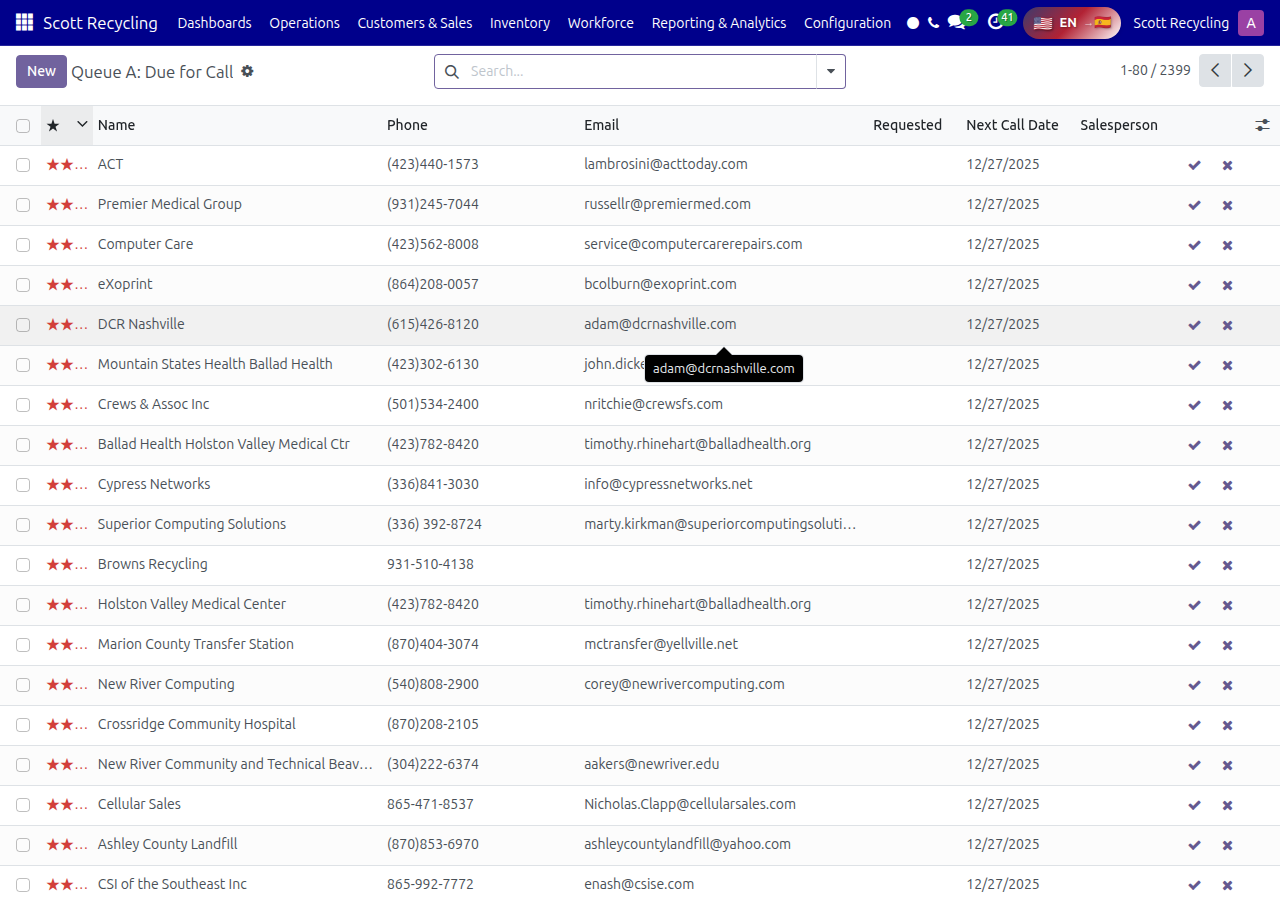
For the full system guide, see Customer Call Queues.
Remember: Every call is an opportunity to build customer loyalty!