Customer Management Mastery
Overview
Complete training for Customer Service Representatives on managing customer relationships, leads, and opportunities in the Scott Recycling system.
Lesson 1: Know Your Company
Learning Objectives
- Understand what Scott Recycling does and why it matters
- Know what items we accept and what we don't
- Understand our service area, locations, and pricing model
- Speak confidently about our services on the phone
Who We Are
Scott Recycling started in the mid-1990s assembling 486 computers in a basement. Today we have six facilities across the Southeast and process millions of pounds of e-waste and plastic each year. Our mission is to lead the way in sustainable and responsible e-waste and plastics recycling.
Our Facilities:
| Location | Role |
|---|---|
| Knoxville, TN (HQ) | Main processing center — 5049 S. National Dr. |
| Nashville, TN | Regional hub — 925 Visco Dr. |
| Atlanta, GA | Regional hub — 1501 General Arts Rd NW |
| Chattanooga, TN | Collection & processing |
| Memphis, TN | Collection & processing |
| Lexington, KY | Collection & processing |
We also have satellite operations in Pulaski, VA and Pine Bluff, AR.
What We Accept
Always accepted (free of charge):
- Complete and partial computer systems (desktops, towers, workstations)
- Laptops and notebooks
- Servers, network hardware (routers, switches, firewalls)
- Monitors (LCD/LED flat panels)
- Printers, scanners, copiers, fax machines
- Cell phones, tablets, GPS devices
- Hard drives, SSDs, optical drives, floppy drives
- Keyboards, mice, cables, peripherals
- Barcode scanners, pagers, office phones
- Home electronics (VCRs, DVD players, radios, speakers)
- Microwaves, mixers, small appliances with circuit boards
- Metal components and scrap from electronics
- Plastic housings and components
Accepted with a recycling fee:
- CRT monitors (old tube-style)
- CRT televisions
- Other items containing hazardous materials (lead, mercury)
We Do NOT Accept
- Household appliances without circuit boards (refrigerators, washers, dryers)
- Loose batteries (direct customers to local battery recycling)
- Light bulbs / fluorescent tubes
- Smoke detectors
- Medical devices (specialized disposal required)
- Anything containing asbestos
Our Four Core Services
1. Electronics Recycling Our bread and butter. We collect end-of-life electronics from businesses, dismantle them, and sort the by-products — glass, plastic, metal, wire, printed circuit boards — for re-utilization or smelting for remanufacturing. Nothing goes to a landfill.
2. Data Destruction We guarantee secure destruction of all data on hard drives and storage devices. This is a major selling point for hospitals, banks, government agencies, and any business handling sensitive information. We can provide Certificates of Destruction on request.
3. Asset Management We help businesses recover value from outdated or surplus equipment. This includes refurbishing laptops and devices for resale, managing inventory of retired assets, and tracking the entire lifecycle from receipt through disposition.
4. Plastics Recycling Our state-of-the-art equipment grinds and processes plastic materials from electronics housings and other sources, converting waste into reusable resources.
Service Area & Pricing
Service Area: Georgia, Tennessee, Kentucky, Virginia, North Carolina, South Carolina, Arkansas, Mississippi, and Alabama.
Pricing Model: In most cases, our services are free. We're able to service the majority of our enrolled clients at no charge because we recover value from the materials we process. The only items that may carry a small recycling fee are those containing hazardous materials (CRT monitors, CRT TVs) where processing costs exceed recovery value.
This is a key selling point — many competitors charge per pound or per pallet. We pick up for free in most cases.
Why Customers Choose Us
When talking to customers or prospects, emphasize these differentiators:
- Free service for most customers — hard to beat
- 20+ years of experience in the industry
- Certified data destruction — peace of mind for sensitive data
- Six facilities — we're local, not shipping material overseas
- Environmental responsibility — we keep millions of pounds of toxics out of landfills
- Convenience — we come to you, scheduled on your timeline
- Compliance — we follow Responsible Recycling (R2) Standards and e-Steward best practices
Environmental Impact — Why This Matters
E-waste is the fastest-growing waste stream in the world. When electronics go to landfills, toxic materials like lead, mercury, cadmium, and flame retardants leach into soil and groundwater. By recycling properly:
- Precious metals (gold, silver, palladium, copper) are recovered and reused
- Toxic materials are handled safely instead of polluting communities
- Energy is saved — recycling metals uses far less energy than mining new ore
- Customers meet their sustainability and compliance obligations
When a customer asks "why should I recycle with you instead of just throwing it away?" — this is your answer.
Lesson 2: Introduction to Customer Management
Learning Objectives
- Understand the queue-based customer management system
- Navigate customer records efficiently
- Access customer history and communications
- Use customer tags and categories
What is the Queue System?
The Customer Call Queue system is your central hub for managing outbound calls to existing customers. Instead of a traditional pipeline, Scott Recycling uses four automated queues (A, B, C, D) that prioritize customers based on call frequency, pickup history, and email responses.
Key Benefits: - Automated prioritization — the system tells you who to call next - Complete customer history in one place - No customers fall through the cracks - Track all communications and call outcomes
Lesson 3: The Queue System & Prospect Pipeline
Learning Objectives
- Understand the four call queues (A, B, C, D) and their priority
- Know how to work the Prospect Queue for new customers
- Track call cycles and escalations
- Use priority stars to focus on high-value customers
The Four Call Queues
Existing customers are automatically placed into queues based on their status. Work them in priority order: D → C → B → A.
| Queue | Name | Why They're Here |
|---|---|---|
| Queue A | Due for Call | Scheduled follow-up date has arrived |
| Queue B | Escalation | 2+ missed call cycles without contact |
| Queue C | Pickup Overdue | Past their historical pickup average |
| Queue D | Pickup Requested | Responded to email blast requesting pickup |
Priority Stars (0–3)
Each customer shows priority stars based on yearly pickup weight:
- No stars — Low volume
- 1 star — Moderate volume
- 2 stars — High volume
- 3 stars — Top-tier / highest volume
Call higher-star customers first within each queue.
Call Cycle Mechanics
Each cycle allows 3 contact attempts. If all 3 fail, the customer moves to Queue B (Escalation). A successful contact resets the cycle.
The Prospect Queue
New potential customers go through the Prospect Queue with these stages:
- New → Initial Call → DM Identified → Packet Sent → Follow-up Call → Closed (converted)
Each stage has an auto follow-up date. Work prospects whose follow-up dates are due.
Qualifying Prospects
Questions to Ask:
- "What kind of electronics does your company typically retire?" — Are they generating laptops, desktops, servers, monitors, networking equipment? The more variety and volume, the better the fit.
- "How often do you cycle out equipment?" — Monthly, quarterly, annually? Regular generators are ideal long-term customers.
- "Roughly how much material are we talking about?" — Pallets? Boxes? A few items? This helps us plan logistics. Even a few boxes can work if it's regular.
- "Where are you located?" — Confirm they're in our 9-state service area (GA, TN, KY, VA, NC, SC, AR, MS, AL).
- "Who handles IT asset disposal decisions?" — Get to the decision maker (IT Director, Facilities Manager, Office Manager).
- "How are you currently handling end-of-life electronics?" — Are they using a competitor? Stockpiling? Throwing it away? Each answer shapes your pitch.
- "Do you need data destruction documentation?" — Hospitals, banks, schools, and government agencies almost always need Certificates of Destruction. This is a strong hook.
- "When are you looking to start?" — Gauge urgency.
Our Best Customer Types:
- Corporate offices — regular IT refresh cycles, bulk volume
- Hospitals & healthcare — strict data destruction requirements, HIPAA compliance needs
- Banks & financial services — sensitive data, regulatory requirements
- Schools & universities — bulk computer lab refreshes, budget-conscious (our free service model is perfect)
- Government agencies — compliance-driven, need documentation
- Data centers — high-value equipment (servers, switches, storage)
- Manufacturers — production equipment turnover, plastic waste
Red Flags (Likely Not a Fit):
- Outside our 9-state service area
- One-time residential cleanout with only a few items (direct them to our public drop-off locations instead)
- Locked into a long-term contract with a competitor
- Only have household appliances (refrigerators, washers — we don't take those)
- No authority to make disposal decisions
- Asking about paying us to take hazardous waste we don't handle (batteries, fluorescent tubes, etc.)
Automated Reminders
The system includes built-in reminder tools:
- Queue items appear automatically when follow-up dates arrive
- Escalation happens automatically after failed call cycles
- Prospect follow-up dates are set per stage
- Nothing falls through the cracks
Lesson 4: Customer Communication Best Practices
Communication Channels
- Phone calls (primary) — outbound queue calls and inbound customer requests
- Email (documentation) — pickup confirmations, follow-ups, data destruction certificates
- Internal notes (team visibility) — chatter notes on customer records for your team
- SMS (automated reminders only) — pickup blast emails and reminders, sent by the system
Phone Communication
Inbound Greeting: "Thank you for calling Scott Recycling, this is [Your Name]. How can I help you today?"
Outbound Queue Call: "Hello, this is [Your Name] with Scott Recycling. I'm calling to check in on your electronics recycling needs — do you have a few minutes?"
Best Practices:
- Listen actively before responding — let the customer tell you what they need
- Pull up their record BEFORE dialing so you have context (last pickup, notes, queue status)
- Take notes during the call — you'll log them right after
- Confirm next steps: "So I'll get a pickup scheduled for next Thursday. You said about 4 pallets of laptops near the loading dock. Is that right?"
- Log the call immediately — never wait until later
Common Inbound Call Topics & How to Handle Them:
| Customer Says | What To Do |
|---|---|
| "I need to schedule a pickup" | Get volume, location, preferred date. Schedule it in the system. |
| "When is my next pickup?" | Check their customer record for scheduled dates. |
| "What do you accept?" | Refer to the items list in Lesson 1. Most electronics = yes, free. CRTs = small fee. |
| "Do you do data destruction?" | Yes! We guarantee secure destruction. We can provide a Certificate of Destruction. |
| "How much does it cost?" | Free in most cases. CRT monitors/TVs carry a small recycling fee. |
| "I have batteries / light bulbs" | We don't handle those. Direct them to their local waste management for proper disposal. |
| "I'm in [state outside our area]" | We currently service GA, TN, KY, VA, NC, SC, AR, MS, and AL. Offer to check if we can accommodate. |
Email Communication
Professional Email Structure:
- Clear subject line: "Scott Recycling — Pickup Scheduled for [Date]"
- Greeting with customer name
- Brief, focused message — confirm what was discussed
- Clear call-to-action: "Please have items staged at the loading dock by 8 AM."
- Professional signature with your name and Scott Recycling contact info
Email Response Times:
- New inquiries: Within 4 business hours
- Customer questions: Within 24 hours
- Urgent issues (missed pickup, complaint): Immediately
Lesson 5: Handling Customer Issues & Complaints
Issue Resolution Process
- Listen: Let customer fully explain without interrupting
- Empathize: "I completely understand your frustration. Let me look into this right now."
- Investigate: Pull up their record, check pickup history, read notes
- Solve: Offer a concrete solution with a specific date/time
- Follow-up: Check back after the resolution to confirm satisfaction
Common Issues & How to Handle Them
Missed Pickup: This is our most common complaint. A customer was expecting a pickup and the truck didn't show.
- Apologize immediately: "I'm sorry about that — let me find out what happened."
- Check the customer record and pickup schedule — was it actually scheduled? Was the truck rerouted?
- Reschedule ASAP and give them priority: "I can get a truck out to you [tomorrow / this Friday]. Does that work?"
- Log the incident in the chatter so operations can see the pattern
- If this is a repeat issue for the same customer, escalate to your supervisor
"What happened to my material?" Customers sometimes call weeks after a pickup wanting to know what happened to their equipment.
- Look up the customer's pickup records
- Check the inventory system for their devices (by serial number or pickup date)
- Provide processing status: received, being tested, graded, listed for sale, etc.
- If they need a Certificate of Destruction for data-bearing devices, note this on the record
CRT Fee Disputes: Customers sometimes push back on the recycling fee for CRT monitors/TVs.
- Explain clearly: "CRT glass contains lead, which requires special handling by certified processors. The small fee helps cover that specialized processing."
- Emphasize: "Everything else we pick up is at no charge."
- If they have a large quantity of CRTs mixed with other electronics, work with your supervisor on pricing — the value of the other material may offset the CRT fee
"Your competitor is cheaper / free": 1. Don't badmouth competitors 2. Ask: "What services are they including? Do they provide Certificates of Destruction? Are they certified?" 3. Emphasize our track record: 20+ years, six facilities, certified data destruction, responsible processing 4. Remind them: "Our services are already free for most items. We're competitive because we recover value from the materials."
Data Destruction Concerns: Especially common with hospitals, banks, and government accounts.
- Confirm: "We guarantee secure destruction of all data on hard drives and storage devices."
- Offer documentation: "We can provide a Certificate of Destruction for your compliance records."
- For highly sensitive accounts, mention: "We can also arrange on-site physical destruction if needed — I'll connect you with our asset management team."
When to Escalate
Escalate to your manager when:
- Customer demands to speak with a manager
- Issue involves a refund or credit authorization
- A complaint about a specific employee or driver
- Legal threats or mention of lawyers
- Safety concerns during a pickup
- Customer is a key account (high stars) threatening to leave
- You're unsure of the answer — it's always better to say "Let me get you to someone who can help" than to guess
Lesson 6: Customer Retention & Growth
Why Retention Matters
It's much cheaper to keep an existing customer than to find a new one. Our queue system is specifically designed to prevent customers from falling through the cracks. But the system only works if YOU make quality calls with genuine interest in the customer's needs.
Retention Strategies
Stay Proactive — the Queue System Helps:
- Queue A ensures regular check-ins based on each customer's call cycle
- Queue C catches customers whose pickup frequency has dropped
- Queue B escalates customers we haven't been able to reach
- Your job is to make each touch point count — don't just check a box
During Routine Calls, Ask:
- "Has anything changed with your operations since we last talked?" — catches moves, closures, expansions
- "Are you happy with the pickup schedule we have?" — surfaces minor complaints before they become major
- "Do you have any upcoming projects? Office moves, equipment refreshes?" — identifies big pickup opportunities
- "Is there anything else we can help with?" — opens the door for data destruction, asset management, etc.
Warning Signs of Churn:
- Pickup frequency drops significantly
- Customer is hard to reach (stuck in Queue B)
- Multiple complaints about the same issue
- They mention "looking at other options" or "getting quotes"
- They ask about cancellation or contract terms
When you spot these signs: Log it in the chatter, flag it for your manager, and try to address the root cause in your call.
Growing the Account
Natural Upsell Opportunities:
| Customer Situation | What to Offer |
|---|---|
| "We're opening a new office" | Pickup service at the new location |
| "We're upgrading all our laptops" | Large-scale pickup + data destruction certificates |
| "We have old servers in the data center" | Server decommissioning + certified data destruction |
| "We also have a lot of plastic waste" | Our plastics recycling service |
| "Our IT guy handles disposal himself" | Suggest freeing up his time — we handle everything, including documentation |
| "We need compliance documentation" | Certificates of Destruction, environmental impact reports |
How to Suggest Naturally:
- "A lot of our customers in healthcare find the data destruction certificates really valuable for HIPAA compliance — would that be helpful for you?"
- "Since you're refreshing equipment at both locations, we could schedule pickups to hit both in one trip."
- "We also process plastics — if you're generating plastic scrap from packaging or manufacturing, we can handle that too."
Never be pushy. You're offering value, not selling. If they say no, move on.
Final Assessment Quiz
Complete the 10-question assessment to demonstrate mastery of customer management.
Quick Reference Checklist
Daily Tasks:
- Work call queues in priority order (D → C → B → A)
- Check Prospect Queue for due follow-ups
- Respond to inbound calls and new inquiries
- Log all customer interactions immediately — don't batch them
- Review Queue D first thing in the morning for new pickup requests
Weekly Tasks:
- Review Queue B escalations with your manager — who do we need to try harder to reach?
- Follow up on stalled prospects — anyone stuck at "DM Identified" or "Packet Sent" too long?
- Check key accounts (highest stars) — are they being serviced well?
- Team sync on any customer complaints or issues
Monthly Tasks:
- Review your prospect conversion rate — how many New → Closed?
- Look for upsell opportunities in your customer base (new locations, data destruction, plastics)
- Review any recurring complaints for patterns
- Training refresher — revisit one lesson from this course
Quick Reference: What We Accept
| Category | Examples | Fee |
|---|---|---|
| Computers | Desktops, laptops, servers, workstations | Free |
| Networking | Routers, switches, firewalls, cabling | Free |
| Peripherals | Keyboards, mice, printers, scanners, copiers | Free |
| Mobile | Cell phones, tablets, GPS devices, pagers | Free |
| Storage | Hard drives, SSDs, tape drives | Free |
| Monitors | LCD/LED flat panels | Free |
| CRT monitors/TVs | Old tube-style monitors and televisions | Small fee |
| Home electronics | VCRs, DVD players, radios, speakers | Free |
| Office electronics | Fax machines, barcode scanners, office phones | Free |
| Metals | Metal components and scrap from electronics | Free |
| Plastics | Housings and components from electronics | Free |
We do NOT accept: Household appliances (fridges, washers), loose batteries, light bulbs, fluorescent tubes, smoke detectors, medical devices.
Doing This in Odoo
Now that you understand customer management concepts, here's where to apply them in the system:
Working Your Call Queues
Everything you learned about customer call management happens in the Scott Recycling app under Customers & Sales. Open it to see your call queues:
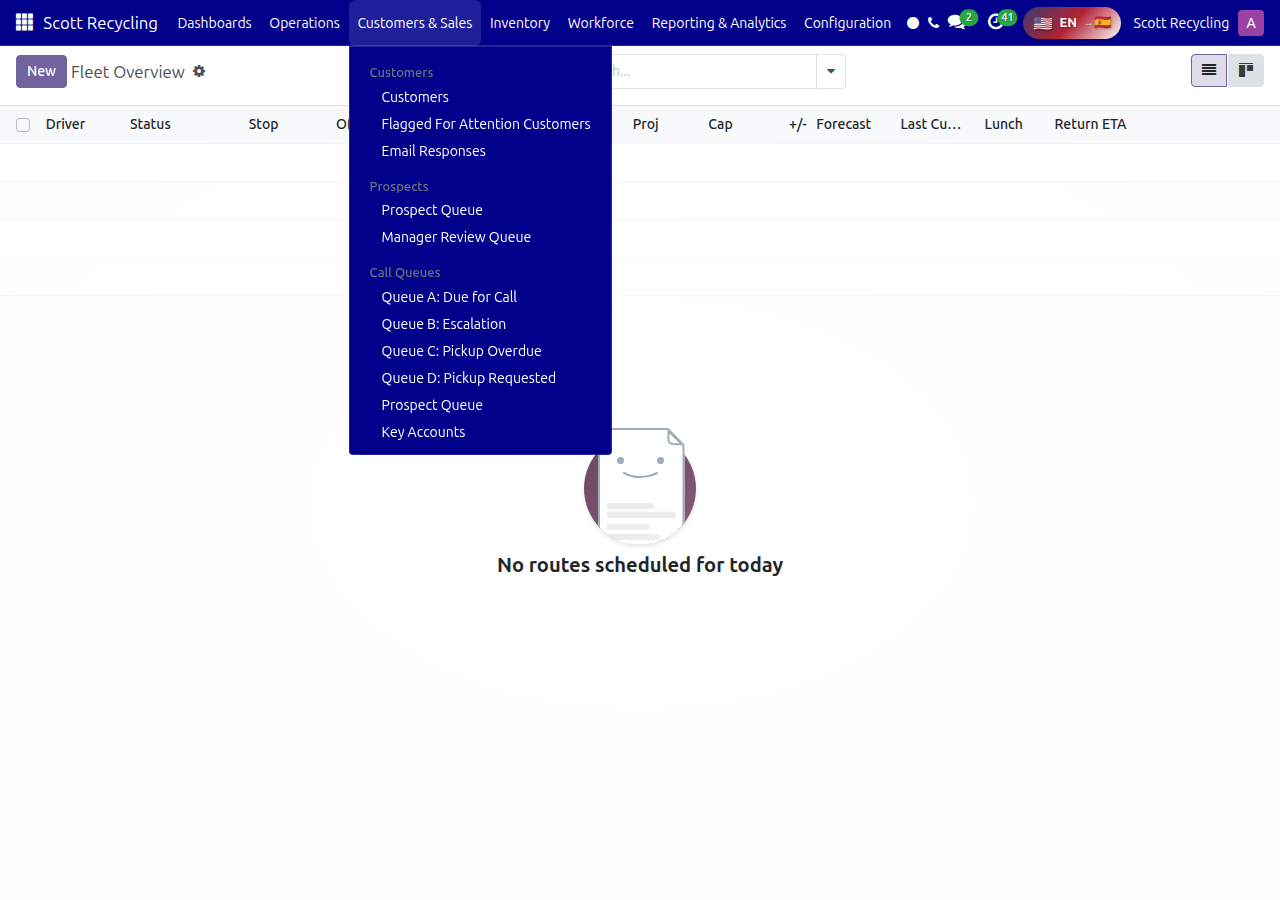
- Finding your queue → Scott Recycling → Customers & Sales → select Queue A, B, C, or D
- Logging successful calls → Open a customer record → click Log Successful Contact
- Logging failed calls → Open a customer record → click Log Failed Contact
- Checking key accounts → Scott Recycling → Customers & Sales → Key Accounts
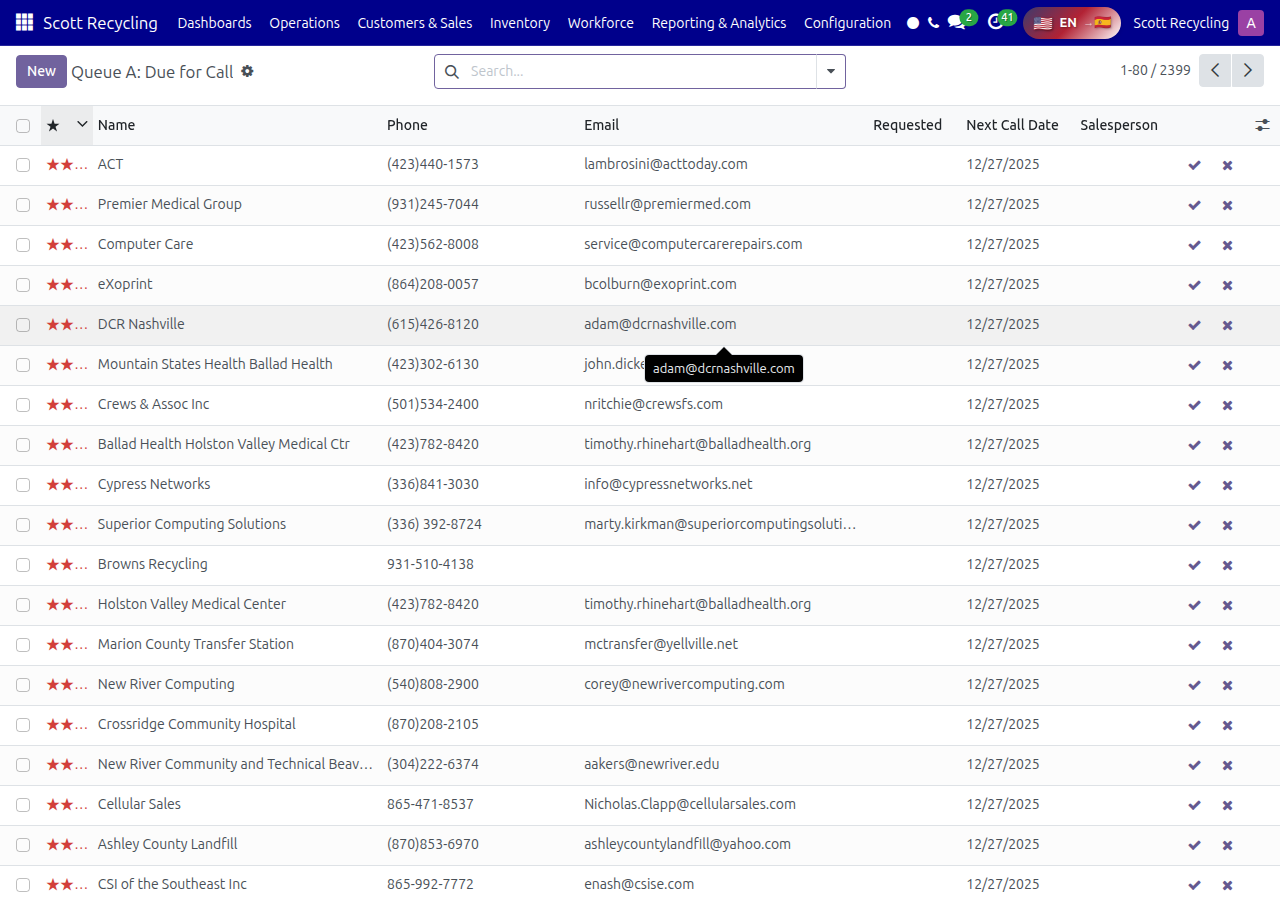
For the full step-by-step guide, see Customer Call Queues.
Working the Prospect Queue
New prospect outreach happens in the Prospect Queue:
- Finding prospects → Scott Recycling → Customers & Sales → Prospect Queue
- Advancing prospects → Use the action buttons (Mark Initial Call, Mark DM Identified, etc.)
- Flagging issues → Use the Not Interested or Contact Issue wizards
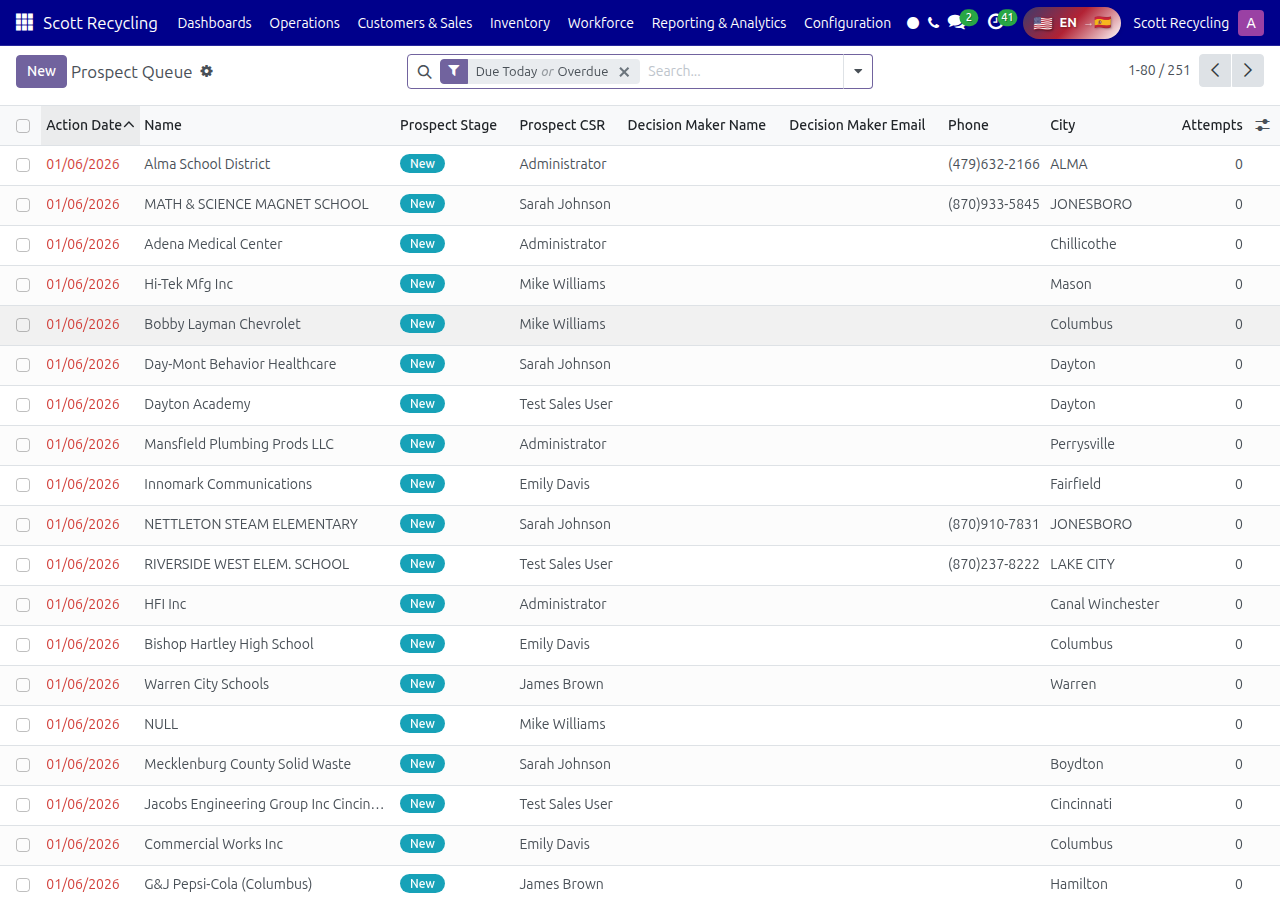
For the full step-by-step guide, see Prospect Queue.
Communication Logging
When you log calls and send emails (Lesson 3), all of it is tracked automatically:
- Phone calls → Use Log Successful/Failed Contact on the customer record
- Emails → Send from within the customer record; they're logged automatically
- Internal notes → Use the chatter to add notes visible to your team
Customer Retention (Lesson 5)
The queue system automates much of the retention work discussed in Lesson 5. Customers at risk of churning appear in Queue B (Escalation) and Queue C (Pickup Overdue) automatically.
Questions? Contact your supervisor or refer to the Call Queues Guide for detailed system documentation.