Pickup Weight Report
Last Updated: February 2026 Target Audience: Operations Managers
The Pickup Weight Report provides a detailed view of pickup weights by customer, with expandable category breakdowns and export options.
Navigation: Scott Recycling > Reporting & Analytics > Operations > Dynamic Pickup Weight Report
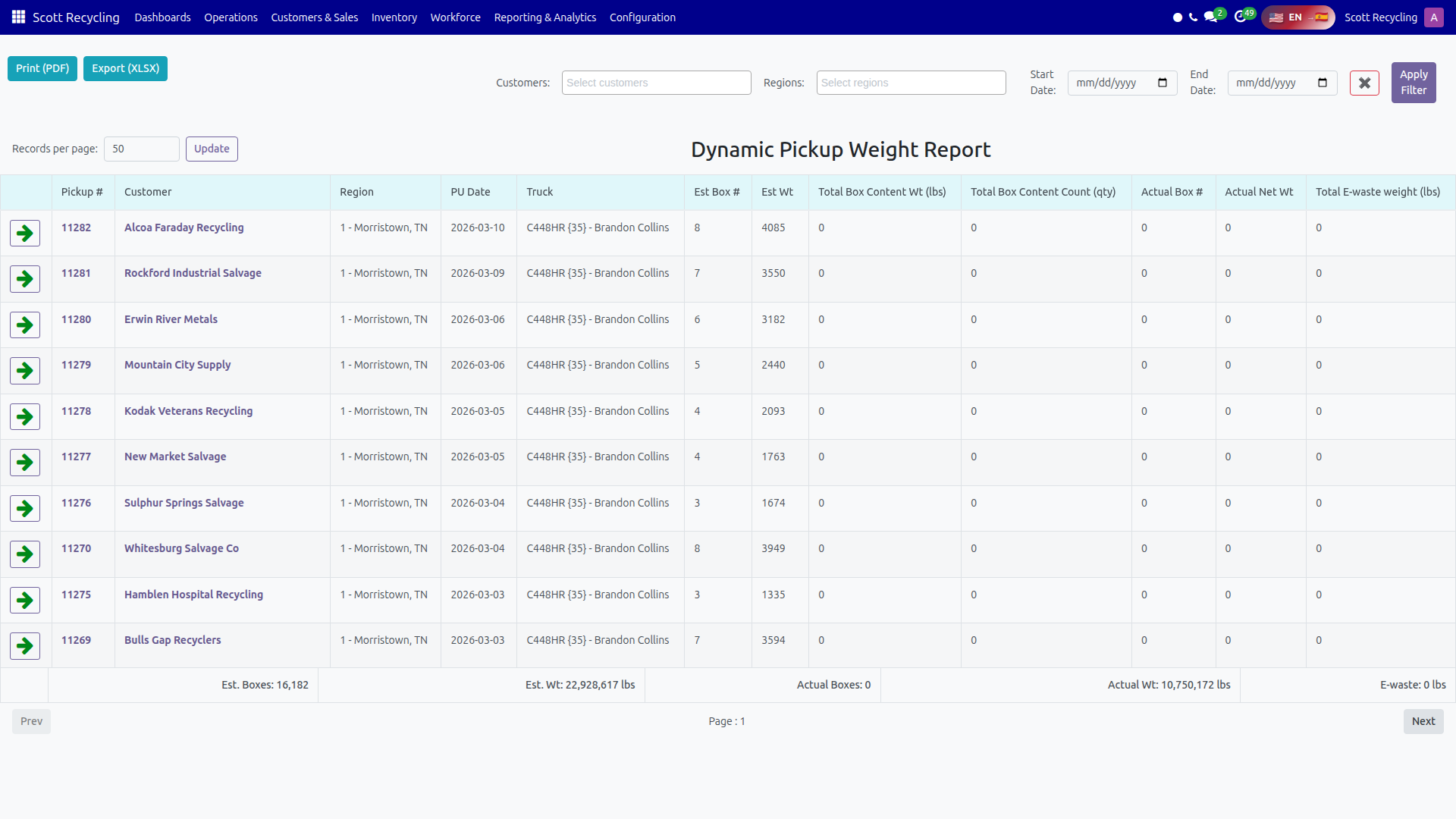
Filters
| Filter | Type | Description |
|---|---|---|
| Customers | Multi-select dropdown | Filter by one or more customers |
| Regions | Multi-select dropdown | Filter by one or more regions |
| Start Date | Date picker | Beginning of date range |
| End Date | Date picker | End of date range |
- Set your desired filters.
- Click Apply Filter.
- Click the X button to clear all filters and reload.
Report Columns
| Column | Description |
|---|---|
| Pickup # | Pickup ID (links to the pickup form) |
| Customer | Customer name (links to the customer form) |
| Region | Customer's region |
| PU Date | Pickup date |
| Truck | Assigned truck, or "No Truck Assigned" |
| Est Box # | Estimated number of boxes |
| Est Wt | Estimated weight (lbs) |
| Total Box Content Wt (lbs) | Total weight of box contents |
| Total Box Content Count (qty) | Total item count from box contents |
| Actual Box # | Actual number of boxes received |
| Actual Net Wt | Actual net weight (lbs) |
| Total E-waste weight (lbs) | E-waste weight (lbs) |
Expandable Category Breakdown
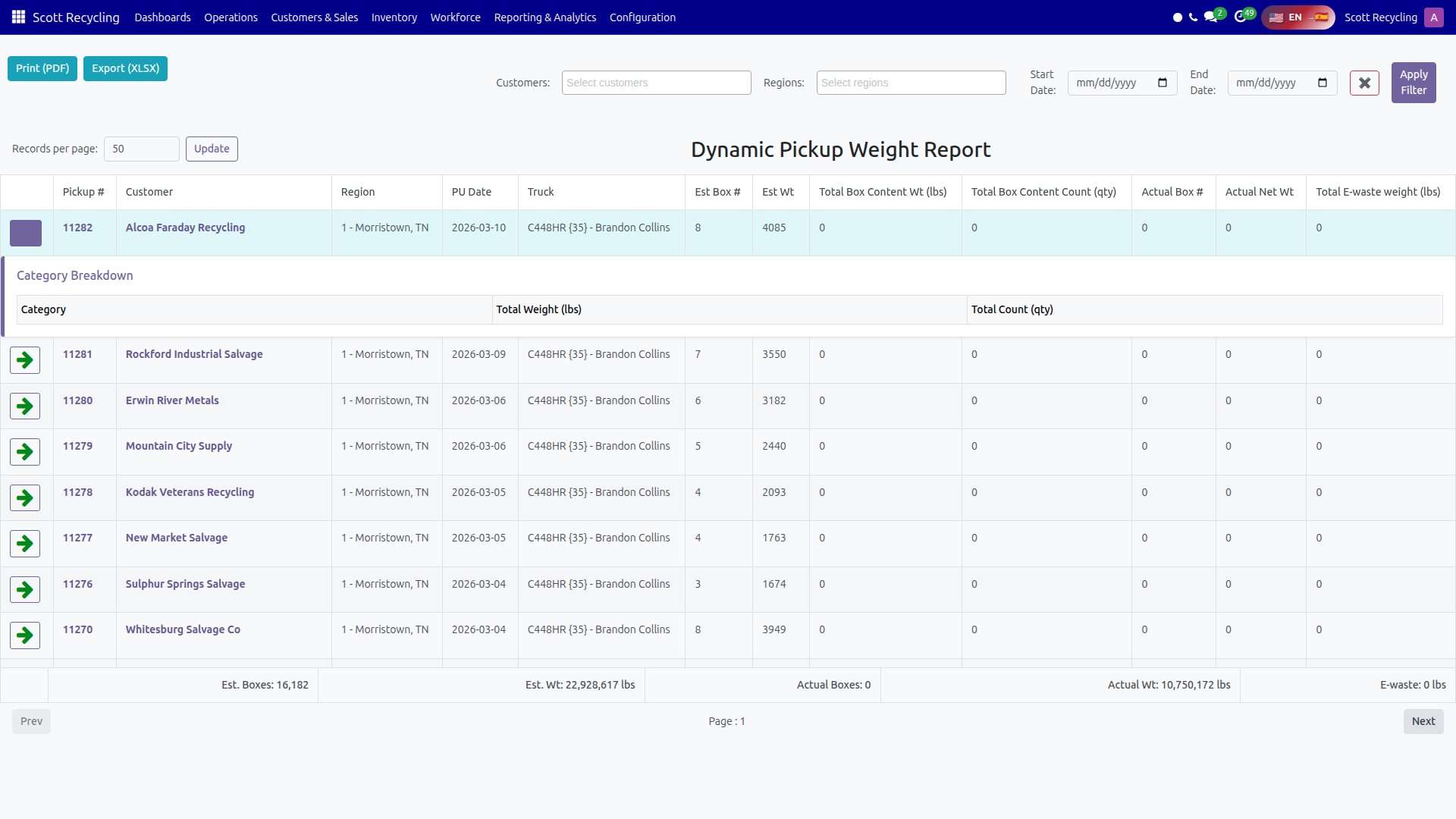
Click the arrow icon on any pickup row to expand it and see the category-level breakdown.
| Column | Description |
|---|---|
| Category | Product category name |
| Total Weight (lbs) | Weight for that category |
| Total Count (qty) | Item count for that category |
Click the arrow again to collapse the row.
Totals Row
A fixed totals row at the bottom of the table shows aggregate values across all displayed pickups:
- Est. Boxes — Total estimated boxes
- Est. Wt — Total estimated weight (lbs)
- Actual Boxes — Total actual boxes
- Actual Wt — Total actual weight (lbs)
- E-waste — Total e-waste weight (lbs)
Note
The totals reflect the full filtered dataset, not just the current page.
Pagination
| Control | Description |
|---|---|
| Records per page | Enter a number and click Update to change page size |
| Prev / Next | Navigate between pages |
| Page indicator | Shows the current page number |
Export Options
| Button | Format | Details |
|---|---|---|
| Print (PDF) | Generates a printable PDF of the current report view | |
| Export (XLSX) | Excel | Downloads an Excel file with two sheets: summary data and category details |
Common Tasks
Review a specific customer's pickups
- Select the customer in the Customers filter.
- Set the date range.
- Click Apply Filter.
- Expand individual pickups to see category breakdowns.
Export data for analysis
- Apply the desired filters.
- Click Export (XLSX).
- The Excel file includes a summary sheet and a category details sheet.
Troubleshooting
| Issue | Solution |
|---|---|
| No data appears | Check that your date range contains pickups. Clear filters and try again. |
| Category breakdown is empty | The pickup may not have box content records yet. |
| Totals seem wrong | Totals reflect all filtered data. If paginated, the totals still cover the full dataset. |
| Export button not working | Ensure pop-ups are not blocked in your browser. |