Email Pickup Response System
Overview
The Email Pickup Response System allows Scott Recycling to send email blasts to customers with interactive "Need Pickup" and "No Pickup Needed" buttons. When customers click these buttons, the system automatically updates their records and creates appropriate follow-up actions.
Version: 17.0.1.0.0 Last Updated: February 2026 Target Audience: CSRs, Dispatchers, Managers
What This Module Does
| Feature | Description |
|---|---|
| Email Blast Integration | Send mass emails with personalized pickup response buttons |
| One-Click Responses | Customers click a button - no login required |
| Automatic Lead Creation | "Need Pickup" clicks create leads in the Needs Pickup stage |
| Followup Management | "No Pickup" clicks reset the customer's followup cycle |
| Response Tracking | View all customer responses in a dedicated dashboard |
How It Works
Customer receives email → Clicks "Need Pickup" or "No Pickup"
                                    ↓
            System creates note with "Receive Email" result
                                    ↓
            last_decision_maker_date automatically updated
                                    ↓
    "Need Pickup": Lead created/moved to Needs Pickup stage
    "No Pickup": Customer stays in regular followup cycle
Key Benefits
- Proactive Customer Outreach - Reach customers before they call you
- Reduced Call Volume - Customers respond with one click instead of calling
- Queue Integration - Responses flow directly into the existing lead queue
- Automatic Tracking - Every response is logged with timestamps
- No Customer Login Required - Secure tokenized links work without authentication
Training Modules
| Module | Duration | Audience |
|---|---|---|
| User Guide | 20 min | CSRs, Dispatchers, Managers |
| Technical Reference | 30 min | Developers, IT |
Quick Start
For CSRs/Managers (Sending Emails)
-
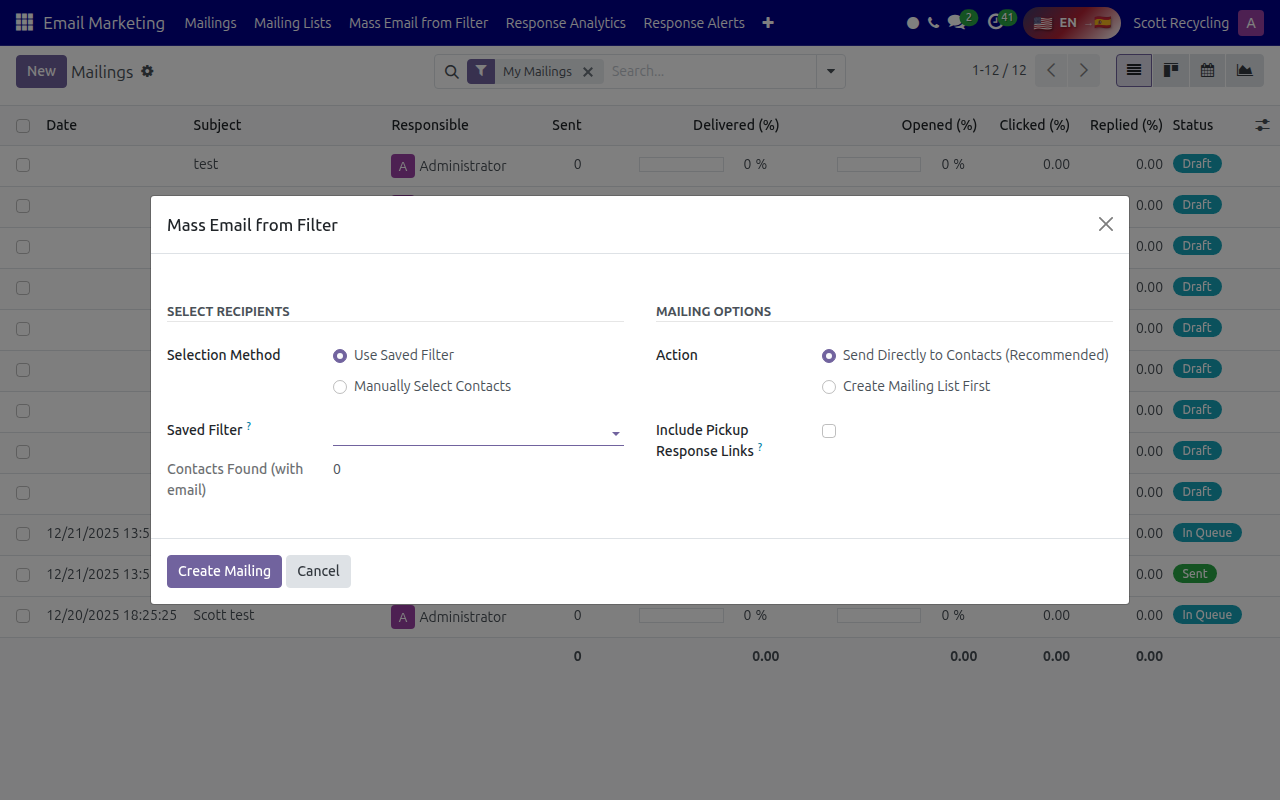
Navigate to Email Marketing → Mass Email from Filter
-
Select customers using a saved filter or manual selection
- Check "Include Pickup Response Links"
- Click Create Mailing
- Review and send the email
For Dispatchers (Processing Responses)
- Monitor SR Management → Leads for new leads in "Needs Pickup" stage
- These leads came from email responses
- Schedule pickups as normal
For Managers (Viewing Responses)
- Navigate to SR Management → Customers → Email Responses
- View all responses with filters for type, date, status
Getting Help
- Questions about sending emails? See the User Guide
- Technical issues? See the Technical Reference or contact IT
- Customer didn't receive email? Check their email address in Contacts